Interface Guide
Toolbar

No. |
Name |
Function |
|---|---|---|
① |
Version |
The coding software version number is displayed here. |
② |
File |
Click the File button to create a new project, open an existing project, save a project, or import a project from your computer. |
③ |
Edit |
Used to restore deleted characters while coding. |
④ |
Device Connection |
Click this button to select and connect devices through the COM port. |
⑤ |
Project Name |
Allows you to change the project name and save the project. |
⑥ |
Tutorial |
Click to view the quick-start video demonstration of the software. |
⑦ |
Settings |
Check for updates, clear cache, view version information, and manage license details. |
Editing Interface
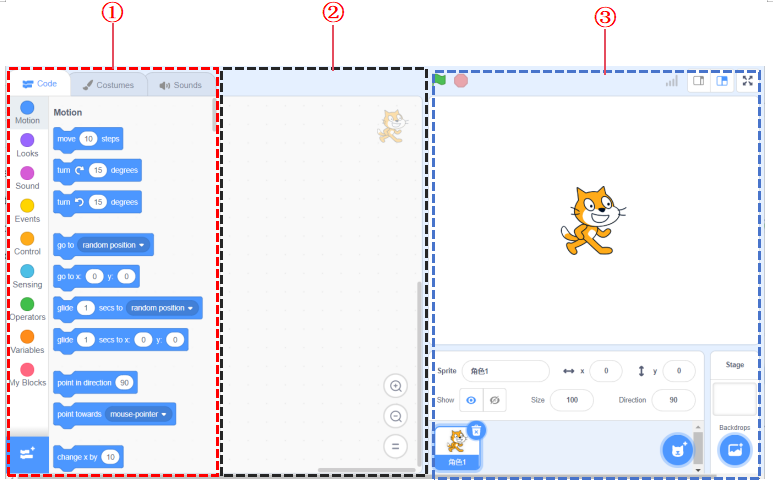
No. |
Name |
Function |
|---|---|---|
① |
Block Instruction Area |
The block instructions are color-coded to differentiate between various types, making it easier to find. |
② |
Coding Area |
Drag and drop block instructions into this area to perform coding operations. |
③ |
Stage Area |
Add characters, backgrounds, and display functions. |